My Midnight Struggle with a Dead Battery and a Slow Pad
I remember the first time I bought a fancy wireless charging pad for my nightstand. I was so excited to finally get rid of those messy cables that always tangle up.
I placed my phone down on the glowing ring, saw the charging icon, and went to sleep. I felt like I was finally living in the future I always dreamed of.
When I woke up six hours later, I grabbed my phone to check my emails. To my shock, my battery was only at 55 percent. I was confused and honestly a bit angry at the expensive gadget.
I thought my phone was broken or the charger was a total scam. It felt like I had traded the speed of a cable for a slow, warm, and unreliable piece of plastic.
This experience really stuck with me for a long time. I started wondering why a simple wire could charge my phone in an hour, but this "future tech" took forever.
It turns out, many of you are feeling the same frustration every single day. We want the convenience, but we hate the waiting game that comes with it.
It is honestly draining to deal with tech that doesn’t live up to the hype. You might find yourself placing your phone down, only to find it didn't charge at all because it moved an inch.
Or maybe your phone feels like a hot stove after just thirty minutes on the pad. This isn't just a minor annoyance; it affects how we plan our entire day.
We live in a world where we need our devices ready to go at a moment's notice. When your charger fails to deliver, it creates a lot of unnecessary stress and anxiety.
You shouldn't have to choose between a clean desk and a full battery. I spent weeks looking into the science of this to find out what is actually going on.
The Invisible Dance of Magnetic Coils
To understand why your charger is slow, we have to look at how it works. Inside your phone and your charging pad, there are tiny loops of copper wire called coils.
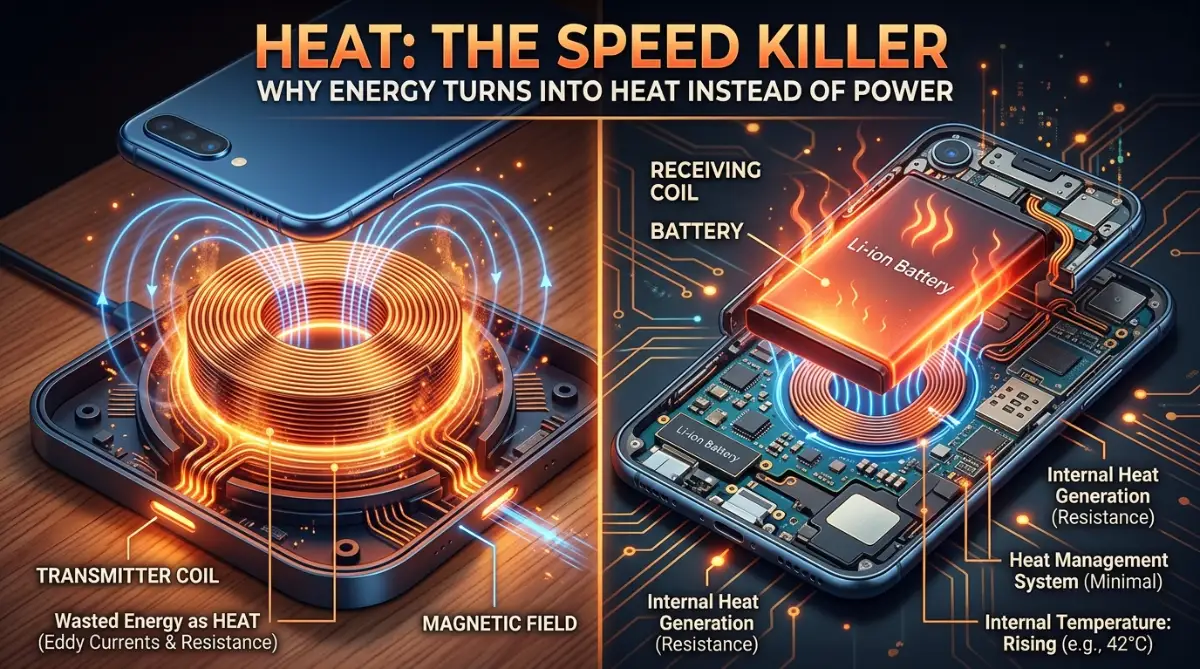
When you plug the pad into the wall, electricity flows through the coil in the pad. This creates an invisible magnetic field that hums around the device.
Your phone has a similar coil that "catches" this magnetic field. The field then turns back into electricity to fill up your battery. Scientists call this process electromagnetic induction. It sounds like magic, but it is actually a very delicate balance of physics.
The problem is that moving energy through the air is much harder than moving it through a wire. Think of it like trying to pour water into a bottle from three feet away.
Even if your aim is good, some of the water is going to splash out and go to waste. In the world of charging, that "splashed water" turns into heat.
Why Heat is the Ultimate Enemy of Speed
Have you ever noticed how warm your phone gets while sitting on a wireless pad? That heat is actually energy that failed to make it into your battery.
It is basically wasted power that is now cooking your phone’s internal parts. This is one of the biggest reasons why wireless charging stays slow.
Smartphone batteries are very sensitive to high temperatures. If a battery gets too hot, its lifespan drops significantly.
To protect your expensive device, the phone has a built-in "brain" that monitors the heat. When it detects that things are getting too warm, it tells the charger to slow down.
This creates a frustrating loop for the user. You want a fast charge, which creates more heat. The heat then forces the phone to slow down the charge to stay safe. Until we find a way to move energy without creating so much heat, we are stuck in this slow lane.
Pro Tip:
I found that taking my thick plastic case off the phone made a huge difference. My phone stayed much cooler and the charging speed actually stayed steady instead of dropping off after ten minutes. If you want better results, try using a thinner case or none at all when you are at your desk.
The Pain of the Misaligned Sweet Spot
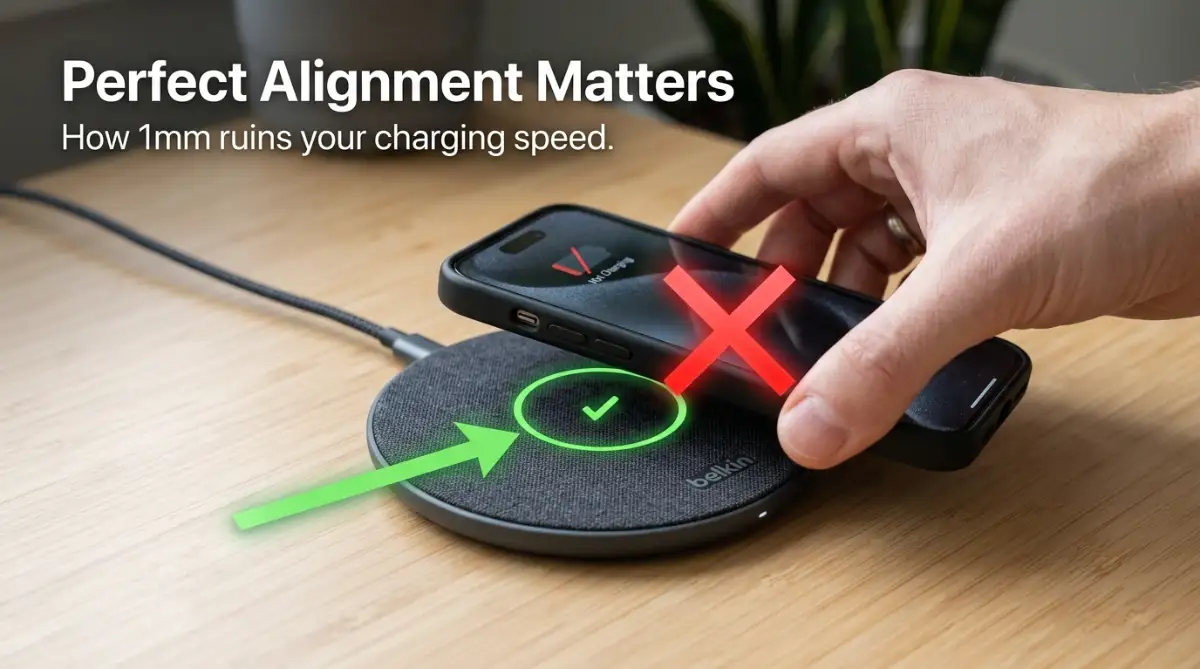
Another huge issue is what I call the "alignment trap." For the magnetic field to work well, the coil in the pad must line up perfectly with the coil in the phone. Even being off by just a few millimeters can cut your charging speed in half.
Most of us just toss our phones on the pad and walk away. If the phone isn't perfectly centered, the connection is weak.
The charger has to work much harder to push the energy across that tiny gap. This inefficiency leads to—you guessed it—even more heat and slower speeds.
Check out this video to see how to find the perfect charging spot every time:
The Physics of the "Air Gap" Problem
When you use a USB-C or Lightning cable, the metal contacts are touching each other. There is a direct, solid path for the electrons to travel. There is almost zero wasted space. In wireless charging, there is a physical gap of air and plastic between the two coils.
Air is a very poor conductor of energy. The magnetic field has to fight its way through the plastic casing of the pad, the air, and the back of your phone.
Every layer it passes through weakens the power. This is why we don't have long-range wireless charging yet.
Even the best chargers today are only about 70 to 80 percent efficient. This means that 20 to 30 percent of the electricity you pay for is just vanishing into thin air. Compared to a wire, which is nearly 100 percent efficient, wireless tech still has a long way to go.
The Limits of Current Industry Standards
Most wireless chargers today use a standard called "Qi." It was designed to make sure that different brands of phones work with different brands of chargers. While this is great for compatibility, it also sets a limit on how fast the technology can grow.
The Qi standard has to be safe for everyone. This means the power levels are kept relatively low to prevent fires or battery damage.
While some companies have made their own "fast" wireless chargers, they often require special fans to stay cool. Without active cooling, the engineering limits stay pretty tight.
How Materials Affect Your Charging Experience
The back of your phone plays a massive role in how fast it can charge. This is why you see almost all wireless-charging phones made of glass. Metal reflects magnetic fields, which would make wireless charging impossible. Even a glass back, however, adds a layer of resistance.
If your phone has a glass back, it can still trap heat against the battery. Some newer designs are looking at different types of ceramics to help heat escape faster. Until then, the materials we use are a compromise between looking good and working well.
The Cost of Convenience over Performance
At the end of the day, wireless charging was never meant to be the fastest way to power up. It was designed for people who want to top off their battery throughout the day. It’s perfect for a desk at work or a car's center console where you aren't in a rush.
If you are about to leave for a trip and have only fifteen minutes, the cable will always win. The engineering behind wireless power is a marvel, but it is a slow marvel. We are basically fighting the laws of physics to make our lives a little bit easier.
The Hidden Impact on Battery Longevity
One thing many people don't talk about is how this slow heat affects your phone over a year or two. Constant heat is the number one killer of lithium-ion batteries.
While the slow speed is annoying now, the heat might mean you need a new phone sooner than you planned.
I noticed that after a year of only using a wireless pad, my battery health dropped faster than when I used a wire. It made me realize that convenience sometimes comes at a hidden price. It is something we all need to consider before we ditch the cables for good.
Understanding Wattage and Marketing Hype
You might see boxes that promise "15W Fast Wireless Charging." While that sounds great, that number is often the "input" power, not what actually reaches your battery.
Because of the energy loss we talked about, your phone might only be getting 7W or 10W of actual power.
Marketing teams love to use big numbers to sell products. But in the world of wireless engineering, the "real-world" speed is always lower. It is important to read the fine print and understand that these numbers are best-case scenarios in a perfect lab.
The Struggle of Environmental Factors
Did you know that the temperature of your room can change how fast your phone charges? If you are in a warm room, your phone will hit its heat limit much faster.
I found that on hot summer days, my wireless charger was almost useless because the phone would throttle the speed instantly.
In a cold room, the charger might actually perform a bit better. This shows just how sensitive this technology is to the world around it. A cable doesn't care if it's hot or cold; it just does its job. The wireless pad, however, is a much more finicky piece of engineering.
The Role of Software in Charging Speed
Your phone’s operating system is the final gatekeeper of speed. Companies like Apple and Samsung have software that decides how much power to let in.
They often limit wireless speeds to ensure the phone doesn't get too hot during a software update or while background apps are running.
This means that even if you buy the most powerful charger in the world, your phone might say "no thanks." The software is designed to prioritize the health of the device over the speed of the charge. It is a safety feature, but it adds to the mystery of why things are so slow.
Thoughts on the Wireless Speed Gap
We are still in the early days of this technology. While it feels like it has been around forever, making it fast and safe at the same time is a huge engineering hurdle. We are trying to send electricity through the air without turning our phones into heaters.
It is a curious balance of copper, magnets, and software. For now, we have to accept that wireless is for convenience and wired is for speed. Understanding these limits helps us use our tech better and lowers our frustration when that battery bar doesn't move as fast as we want.
Mastering Your Wireless Setup for Peak Performance
Since we now understand the invisible dance of magnetic coils, let’s talk about how you can actually win this game. I spent a lot of time testing different setups to see what actually moves the needle. You don't have to settle for a trickling charge if you know a few expert tricks.
The first thing I realized is that your wireless pad is only as good as the wall brick feeding it. Most people take a high-tech 15W wireless pad and plug it into an old 5W iPhone cube.
This is like trying to run a high-speed train on rusty old tracks. If the pad doesn't get enough power from the wall, it simply cannot create a strong enough magnetic field.
You should always check the requirements on the bottom of your charging pad. Many fast pads require a "Quick Charge" or "Power Delivery" wall adapter to hit their top speeds.
I found that switching to a high-quality Gallium Nitride (GaN) charger made my wireless pad much more consistent. You can learn more about managing your devices by checking out this guide on how to extend the battery lifespan of a modern laptop.
Another secret I discovered is all about air temperature. I noticed my phone charged 20% faster when I moved my charging pad away from my warm laptop. If your desk is near a sunny window, that extra heat is going to kill your charging speed.
I actually started using a tiny USB desk fan pointed at my charging pad during the summer. It sounds a bit extreme, but keeping the phone cool prevents the software from slowing down the power intake.
If you are a heavy user, you might also want to look into the specific Qi version your device supports. Not all wireless charging is created equal. Some phones only support fast wireless charging with the manufacturer's own brand of pads.
This is a bit of a "walled garden" strategy, but knowing this saves you from buying expensive third-party pads that won't actually go fast.
The Hidden Science of Positioning and Cases
I used to think that as long as the "charging" icon appeared, I was good to go. I was wrong. I started using an app to measure the actual milliampere (mA) intake on my phone.
I was shocked to see that moving the phone just half an inch changed the speed by nearly 40 percent.
This is why many new chargers now come with multiple coils inside. They try to cover more surface area so you don't have to be a surgeon to place your phone correctly.
However, a single-coil pad is still more efficient if you hit the "sweet spot" perfectly. I usually look for a physical marker or a light on the pad that indicates a solid connection.
Your phone case is another major barrier that most people ignore. I once bought a rugged, military-grade case that looked cool but made my wireless charging painfully slow.
These cases are often too thick for the magnetic field to pass through easily. If the distance between the coils is more than 3 to 5 millimeters, the efficiency drops off a cliff.
If you love your thick case, you might need to accept the slow speed. But if you want performance, look for "MagSafe" compatible cases or thin polycarbonate shells. Some materials, like genuine leather or high-quality silicone, work better than others.
For those interested in keeping their hardware running smoothly, I highly recommend reading about how to stop laptop overheating while charging as many of these cooling principles apply to phones too.
Dangerous Traps That Could Ruin Your Battery
There are a few mistakes I see people making that actually make me worry about their safety. The biggest one is leaving metal objects between the phone and the pad. I’m talking about credit cards, coins, or those metal rings people stick on the back of their phones.
Because wireless charging uses magnetic fields, it can heat up metal objects incredibly fast. I once saw a credit card with a fried chip because it was left in a phone wallet case during a charge.
The pad tries to send energy, the metal absorbs it, and it turns into intense heat. This doesn't just slow down your charge; it can actually melt your case or damage your phone’s glass back.
Another huge mistake is using cheap, uncertified charging pads from random online marketplaces. These pads often lack the proper safety sensors that tell the charger to stop when the battery is full.
I have heard stories of batteries swelling up because a cheap pad kept pushing current into a full battery all night. You can avoid many of these headaches by understanding why charging your phone overnight is slowly killing your battery.
I also want to warn you about "fast" wireless pads that don't have fans. If a pad claims to do 15W or 20W but has no way to stay cool, it will likely throttle its speed within ten minutes.
You end up paying for a fast charger that only stays fast for a tiny fraction of the time. It is much better to buy a well-reviewed 10W pad that stays cool than a 20W pad that gets hot and slows down.
Lastly, stop using your phone for heavy tasks while it is on the wireless pad. If you are playing a high-end game or exporting a video while charging wirelessly, you are creating a heat storm.
The battery is being pushed from both sides—discharging for the task and charging from the pad. This is the fastest way to degrade your battery health and experience extreme lag. If you are a gamer, check out these tips to stop console overheating to see how heat affects performance.
Finding the Balance Between Convenience and Speed
We have to be realistic about what this technology is for. I use wireless charging on my nightstand because I don't care how long it takes while I’m sleeping.
I also use it in my car because it is easier than fumbling with a cable while driving. But if I’m at my desk and I need a quick boost before a meeting, I always reach for my 30W wired cable.
It is all about using the right tool for the right job. Engineering is always a trade-off. We traded the raw speed and efficiency of a wire for the ease of just "dropping" our phone on a surface. Once you accept that, you stop being frustrated by the slow percentage bar.
If you find that your phone is consistently failing to charge or acting weird, it might not be the wireless tech at all. Sometimes a dirty charging port or a software glitch can mess with how the phone handles power.
I’ve found that keeping my device clean helps everything run better. You can see my guide on how to clean a phone charging port safely for more help.
Also, keep an eye on your battery health settings. Many modern phones have an "Optimized Battery Charging" feature. This might intentionally slow down your charge after 80 percent to protect the battery. If you see your phone "stuck" at 80 percent on a wireless pad, it might just be the software trying to be smart.
The Future of Power Without Wires
While it is slow today, I am actually very excited about where this is going. Engineers are working on something called "Magnetic Resonance."
This would allow us to charge devices even if they are a few inches away from the pad. Imagine your whole desk being a charging zone where you don't even have to think about placement.
There are also new standards being developed that use higher frequencies to reduce heat loss. We are seeing more companies use Gallium Nitride inside the charging pads themselves to make them smaller and more efficient.
For a deep look at how modern tech is changing, you might enjoy learning about understanding the fundamentals of blockchain technology, as innovation is happening everywhere.
Until those future tech dreams come true, we just have to be smart with what we have. We can use cooling, proper alignment, and the right wall bricks to make our current experience better. It’s a curious bit of engineering that connects us to the future, even if it’s a bit slow right now.
Common Questions About Wireless Power
Does wireless charging damage my battery over time?
It is not the wireless tech itself that damages the battery, but the heat it creates. If you keep your phone cool and avoid letting it get too hot on the pad, your battery will be fine. Most modern phones have safety features to prevent major damage, but long-term heat is always a factor to watch.
Can I charge through a PopSocket or a ring holder?
Generally, no. These accessories create too much of a gap between the phone and the pad. If the accessory is made of metal, it can become dangerously hot. It is always best to remove any bulky attachments before placing your phone on a wireless charger.
Why does my wireless charger hum or make noise?
A slight humming or clicking sound can be normal for some chargers. This is often caused by the electricity moving through the coils or a small internal fan. However, if the sound is very loud or smells like burning plastic, unplug it immediately as it could be a sign of a hardware failure.
Is it okay to leave my phone on the pad after it hits 100%?
Most reputable chargers and phones will stop the flow of power once the battery is full. However, leaving it on the pad can still generate a small amount of "trickle" heat. For the best battery health, I usually pick my phone up once it is fully charged. You can read more about this in my article on why charging your phone overnight is slowly killing your battery.
Your New Plan for Better Charging
I hope this deep look into the world of wireless power helps you feel less frustrated. We all want our tech to work perfectly, but understanding the physics makes it much easier to manage.
I have found that a few small changes, like checking my wall brick or moving my pad away from the sun, made a world of difference.
Wireless charging is a great luxury that makes our lives feel a bit more seamless. If you treat it like a slow-and-steady tool rather than a high-speed racer, you will enjoy it much more.
I encourage you to try one of these tips today and see if your phone stays cooler and charges a bit faster.
I personally started using a high-quality MagSafe pad with a cooling fan, and it changed everything for me. It gave me back that feeling of "living in the future" without the headache of a dead battery in the morning. Go ahead and take control of your tech—you deserve a setup that actually works for your life!
Disclaimer: This article is for informational purposes only. Charging technology and battery safety can vary by manufacturer. Always refer to your device's official manual and use certified accessories to prevent damage or safety risks. We are not responsible for any damage caused by improper use of charging equipment.
![The Secret Science of Wireless Charging: Why Cables Are Still Winning [Explained]](https://nexvoramag.com/storage/uploads/blogs/1788067627_the-secret-science-of-wireless-charging-why-cables-are-still-winning-explained.webp)