My Frustrating Weekend with a "Smart" Device and the Lesson I Learned
I remember sitting in my living room last Saturday, trying to use a simple voice command to turn off my lights. My internet was acting up, as it often does when it rains. I kept saying "Turn off the lights," but my smart speaker just blinked a frustrating red light at me.
It felt so silly. Why did a command as simple as "lights off" need to travel 2,000 miles to a server in another country just to talk to a bulb three feet away?
That was my breaking point. I started digging into why our "smart" world is actually so dependent on a Wi-Fi signal. It turns out, I wasn't alone in this struggle. Millions of us deal with lag, privacy fears, and the total loss of features when our router decides to take a nap.
This lead me to a massive discovery that is changing everything right now: the rise of AI chips that don't need the internet at all.
For a long time, I felt like Big Tech was always watching. Every time I used an AI tool, I knew my data was being uploaded somewhere. It felt like a trade-off. If I wanted cool features, I had to give up my privacy.
My mental peace was constantly tested by news of data breaches and server hacks. I wanted a way to have the power of AI without the risk of being "online" 24/7.
The Problem with Staying Constantly Connected
Most of us use AI every day without thinking about the "Cloud." When you ask a chatbot a question or use a filter on your photos, that data usually leaves your phone.
It travels through cables, hits a massive data center, and then comes back. This process is slow. If your internet is weak, the AI becomes useless. It’s like having a brain that only works if you’re holding a phone line open.
This creates a huge gap in our security. Think about your private photos or your voice recordings. Do you really want them sitting on a server somewhere? Probably not.
The stress of knowing your digital life is "out there" is real. We have become slaves to the signal. If the signal dies, our "smart" world becomes "dumb." This is exactly why the new generation of AI hardware is focusing on "Edge AI" or local processing.
How "Brain-on-a-Chip" Technology is Changing the Game
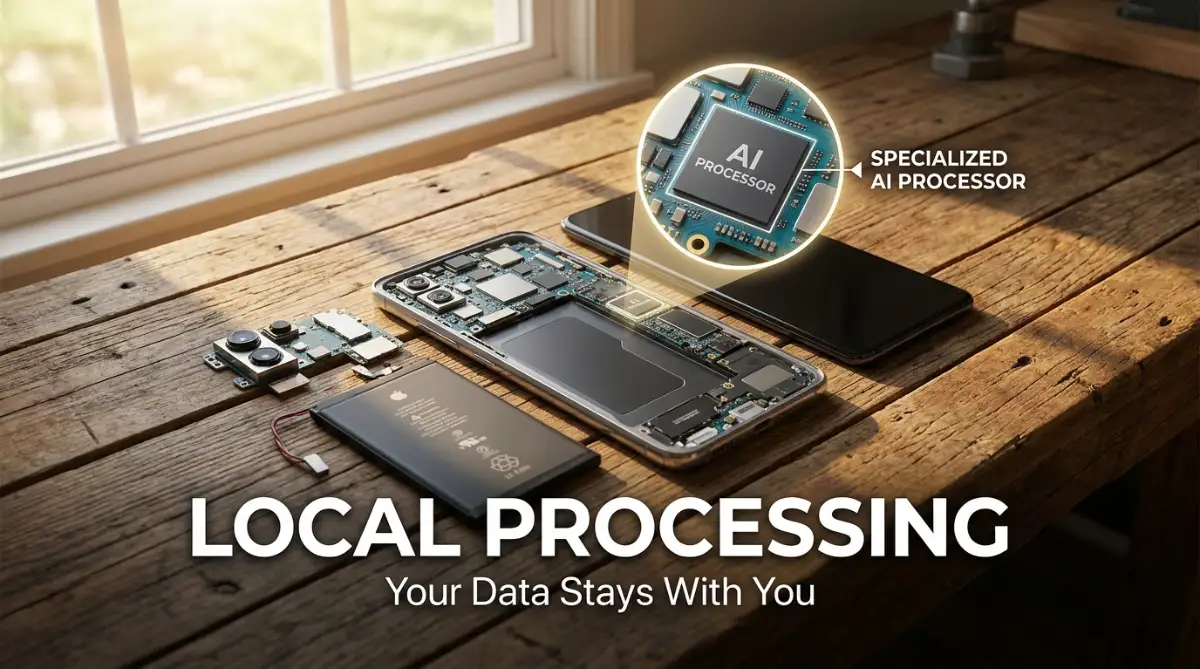
The secret behind this shift is something called an NPU, or Neural Processing Unit. Unlike the chip that runs your basic apps, an NPU is built like a human brain. It is designed to handle "neural networks" right on your device.
This means the thinking happens inside your phone, your camera, or even your microwave. No internet cable is required for it to make smart decisions.
I realized something huge while testing one of these new devices. I didn't need to wait for a loading bar. The response was instant. It felt like the device was finally mine, not something I was just "renting" from a service provider.
This technology is not just a small upgrade; it is a total rebuild of how computers work. We are moving from "connected AI" to "resident AI."
The Foundation of Local Intelligence: Breaking the Cloud Chains
To understand why this is such a big deal, we have to look at how these chips are built. Traditional chips were made for general tasks. They are like a Swiss Army knife.
They can do everything, but they aren't the best at one specific thing. AI chips, however, are like a master chef. They are built for one job: processing massive amounts of data patterns instantly.
When you use a new phone with a built-in AI chip, it can recognize your face in milliseconds. It doesn't need to ask a server, "Is this the owner?"
It already knows. It has a local "map" of your data that never leaves the hardware. This is the science of local inference. By keeping the data on the silicon, we remove the middleman.
1. The Speed of Local Inference vs. Cloud Latency
One of the biggest wins here is Latency. In the tech world, latency is the time it takes for a signal to go and come back. Cloud AI has high latency.
Local AI has almost zero. This is why self-driving cars cannot rely on the internet. Imagine a car needing to "check the cloud" before it hits the brakes! It would be a disaster.
The new generation of chips brings this "instant" safety to your pocket. Whether it's translating a language in real-time or enhancing a video, the chip handles the load.
This makes your user experience smooth and frustration-free. You no longer have to stare at a spinning circle while your phone "talks" to a server in California.
2. The Ultimate Shield for Your Personal Privacy
Privacy is the most common reason people are switching to offline AI. When the "brain" is inside your device, your data is physically locked away from the web. Hackers can't steal what isn't on the network. This is a massive shift in how we think about digital safety.
I used to worry about my voice assistant "listening" to me. With an offline chip, the assistant can only hear specific "wake words" locally.
It doesn't record everything and send it to a giant database. This gives us back the control we lost a decade ago. It’s a win for the average user who just wants to feel safe in their own home.
Pro Tip: If you are worried about privacy, always check if your device has a dedicated "NPU" or "Neural Engine." I once bought a cheap smart camera that claimed to have AI, but it was all cloud-based. I learned the hard way that without a local chip, your data is never truly yours. Always look for "on-device processing" in the specs!
3. Energy Efficiency and Battery Life Wins
You might think that doing all this "thinking" on the device would drain the battery. Actually, it’s the opposite. Sending data over 5G or Wi-Fi uses a lot of power.
By keeping the tasks local, the chip uses much less energy. This is why new laptops and phones can have "AI features" and still last all day.
These chips are optimized for "low-power states." They can wake up, do a heavy task, and go back to sleep in a fraction of a second.
This efficiency is what allows us to have AI in tiny things like smartwatches and rings. We are seeing a world where even a tiny sensor can "think" for months on a single small battery.
Learn more about how these chips are made in this fascinating breakdown:
This video explains the physical structure of NPUs and why they are so much faster than traditional CPUs for AI tasks.
Practical Steps to Embrace the Offline AI World
If you want to start using this technology today, you don't need to be a scientist. It’s about making the right choices when you upgrade your tech. Most people buy devices based on "Mega-pixels" or "Screen size," but the real power is in the silicon.
Look for Dedicated AI Hardware
When you go shopping for a new laptop or phone, look for names like "Neural Engine," "Tensor Processing Unit," or "NPU." These are the labels that tell you the device can think for itself. If a device doesn't have this, it will always be reliant on the cloud. I have found that spending a little more on a device with a dedicated AI chip saves me so much time in the long run.
Use Local-First Applications
Many software developers are now making "local-first" apps. Instead of using a web-based translator, look for apps that allow you to download the "language model" to your phone.
Once downloaded, you can turn off your Wi-Fi and it will still work perfectly. This is a lifesaver when you are traveling or in a basement with no signal.
Audit Your Home Privacy
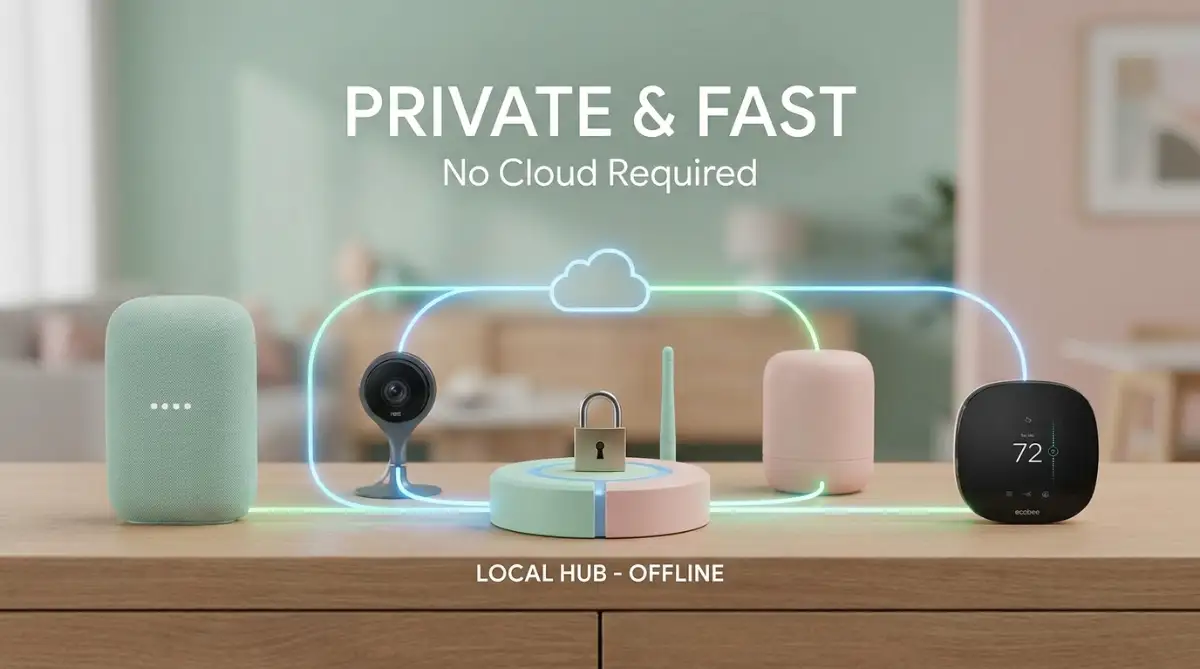
Go through your smart home devices. See which ones stop working when you unplug your router. If they stop working, they are cloud-dependent. Moving forward, try to replace them with devices that support local protocols like Matter or Thread.
These systems are designed to work locally first, keeping your home "smart" even when the internet is "dead."
The Science of Silicon: Why It Matters for You
The magic of these chips isn't just in the speed; it's in the Architecture. A standard CPU (Central Processing Unit) works like a person doing one math problem at a time.
It’s very fast, but it can only do one thing. An AI chip works like a thousand people doing small parts of a giant problem all at once.
This is called Parallel Processing. It is the key to why your phone can now "see" an object in a photo and remove the background instantly.
It doesn't have to look at every pixel one by one. It looks at the whole "pattern" of the image at the same time. This is why offline AI feels so "magical" to the average user.
Why Big Tech is Scared (And Why That's Good for You)
For years, big companies wanted your data. They wanted it in the cloud so they could analyze it and sell ads. Offline AI chips take that power away from them. When your data stays on your chip, they can't see it. This is a huge win for the "little guy."
We are seeing a shift in the market where "Privacy" is becoming a premium feature. The companies that are winning are the ones giving us the tools to be independent.
As a user, this means you have more power than ever. You can choose to be part of the "Cloud" or you can choose to be an "Island." I don't know about you, but I prefer being an island when it comes to my private thoughts and data.
The Future of "Invisible" Intelligence
In the coming months, you will see AI chips appearing in places you never expected. Your refrigerator will know when the milk is sour without sending a photo of your fridge to a server.
Your car will recognize your fatigue by watching your eyes, keeping that data strictly inside the vehicle.
This "Invisible AI" is the best kind. It doesn't ask for a login. It doesn't ask for a subscription. It just works. It makes our lives safer, faster, and more private. We are finally moving past the "Internet of Things" and into the "Intelligence of Things."
By understanding this shift, you are putting yourself ahead of the curve. You are no longer just a consumer; you are an informed user. You know that the real "smart" in smart technology isn't in the cloud—it’s in the silicon in your hand.
Mastering Your Offline Tech: Expert Ways to Get the Most from Local AI
Now that you know what these chips are, you might wonder how to use them like a pro. It isn't just about owning the device. You need to know how to set things up so the AI works for you without calling home to a server.
The first secret is understanding Data Isolation. This means making sure your most sensitive tasks are locked to the chip. For example, if you use voice-to-text features, go into your settings. Look for an option that says "Download language models for offline use."
When you do this, your phone stops sending your voice recordings to the internet. It processes every word right there on the silicon.
This is a great way to how to use artificial intelligence to automate daily productivity tasks while keeping your conversations private. I’ve found that my phone actually dictates faster when it doesn’t have to wait for a Wi-Fi signal.
Another expert move is managing your Neural Engine's workload. Just like a regular processor, these AI chips can get overwhelmed if too many background tasks are running. If you want your face recognition or photo editing to be instant, close apps you aren't using.
You should also keep an eye on your NPU performance. Some high-end laptops now have dashboards where you can see how much of the "AI power" is being used. It’s similar to checking your RAM. If you see the NPU is always at 100%, you might have an app that is poorly coded and draining your resources.
For those of you into smart homes, the real secret is the Matter protocol. This is a new standard that allows devices to talk to each other locally. If your smart hub has an AI chip, it can process your "turn on the lights" command without ever leaving your house.
I remember the first time I set this up. The speed was incredible. It felt like the house was finally responding to me in real-time. To keep this performance high, make sure your hub is placed in a cool, open area. Heat is the enemy of any chip, especially those doing heavy AI thinking.
You can learn more about how physical hardware handles these complex tasks by checking out research on hardware-level security from leading digital rights groups. They often explain why keeping data local is the best defense against mass surveillance.
For long-term success, you must treat your AI-enabled devices with care. Since the chip is doing more work than a standard one, it generates a specific kind of heat.
If you are using an AI-heavy laptop, don't use it on a bed or a soft surface. This blocks the airflow and can slow down the NPU.
Keeping your device cool ensures that the AI stays fast and reliable for years. I always tell my friends that a cool chip is a happy chip.
If you want to keep your hardware running like new, you should check out these tips on how to extend the battery lifespan of a modern laptop.
Heartbreak and Hacks: The Scary Mistakes Most People Make with AI
One of the biggest mistakes I see is people assuming that "AI" always means "Private." Just because a company says they use AI doesn't mean it’s happening on your device. Many apps still send your data to the cloud because it’s cheaper for them.
If you don't check your settings, you might be accidentally giving away your most private moments. I once talked to a person who thought their smart camera was "offline."
It turned out the "AI detection" was happening on a server in another country. Their private living room videos were sitting on a database they didn't control.
This is a huge risk. If that company gets hacked, your face, your home, and your habits are out there for anyone to see. It can lead to identity theft or even physical security risks. Always look for the words "On-Device" or "Local Processing" before you trust a piece of tech.
Another common pitfall is ignoring firmware updates. Many people think updates are just for fixing bugs in the screen or the battery. But for AI chips, updates often include new "weights" for the neural network. These weights make the AI smarter and more efficient.
Without these updates, your AI chip is like a brain that stopped learning. It will get slower over time compared to newer apps. You might find that your voice assistant stops understanding you as well as it used to. Don't skip the "System Update" notification just because you are busy.
Many people also forget about Data Redundancy. They get so excited about local AI that they stop backing up their files. If your AI chip is organizing your photos locally, those organized files are only on that device. If you lose the device, you lose all that smart organization.
I always suggest using a physical backup method that also stays offline. You could use an external drive or a private home server. To understand more about keeping things safe offline, look into how to secure your digital assets using hardware wallets and cold storage.
Finally, many users fail to realize that cheap hardware cannot do real AI. I've seen many people buy budget tablets that claim to have "AI features." These are usually just software tricks that run poorly and drain the battery.
True offline AI requires specialized silicon. If the price seems too good to be true, the chip inside probably isn't a real NPU. You will end up with a device that lags and frustrates you. It’s better to buy one high-quality device than three cheap ones that don't work.
If your current device is already feeling slow, it might be due to heat issues caused by these heavy tasks. You can try some simple fixes for gaming console lag that also apply to other high-performance hardware.
Your Roadmap to a Secure and Intelligent Digital Future
We are standing at a major turning point in history. The days of being forced to share your life with the cloud are coming to an end. You now have the power to choose devices that respect your boundaries.
The rise of offline AI chips is a gift for anyone who values privacy and speed. It means your technology works for you, not for a giant corporation.
You don't have to be a tech expert to benefit from this shift. You just need to be an observant shopper and a mindful user.
Think about how much more peaceful your life would be if you didn't have to worry about the next big data leak. Imagine your devices working perfectly during a storm or a power outage. This isn't a dream; it’s the reality that these new chips are building right now.
It reminds me of the early days of the internet. Back then, everything was local and simple. Then we moved everything to the web. Now, we are bringing the "brain" back home where it belongs. It’s a full circle that brings us the best of both worlds: high intelligence and high privacy.
I truly believe that making the switch to on-device AI is one of the best things I ever did for my digital health. It stopped my constant worrying about who was listening or watching. I want you to feel that same sense of freedom and security starting today.
To keep your digital life even safer, I highly recommend learning how a vpn encrypts your data on public wi-fi networks. Even with AI chips, some tasks will still require the web, and you need to be protected.
The world of technology can feel overwhelming, but you are now armed with the right knowledge. You know what to look for and what to avoid. You are ready to step into a future where your gadgets are truly yours.
My best advice is to start small. Look at your most used device and see if it has any local AI features you haven't turned on yet. Test them out. See how fast they feel compared to cloud-based tools. You will likely never want to go back.
I hope this guide helps you feel more confident about the tech you use every day. It’s an exciting time to be alive, and I’m so glad I could share this journey with you. Go out there and reclaim your digital privacy!
Common Questions About Offline AI Chips
Does an AI chip make my phone slower for regular tasks?
Actually, it makes your phone faster. By moving AI tasks to a dedicated chip, your main processor stays free for things like web browsing and gaming. It’s like adding a second engine to your car specifically for the heavy lifting.
Can I use these AI features if I don't have any internet?
Yes, that is the whole point! Once the AI model is downloaded to the chip, it functions perfectly in the middle of a forest or on a plane. You don't need a single bar of signal to use voice recognition or image processing.
Are these chips the same as the ones used for Bitcoin?
No, they are quite different. While both handle a lot of data, AI chips are designed for "pattern recognition" and "inference." They are much more energy-efficient than the chips used for mining cryptocurrency. You can learn more about this by understanding the fundamentals of blockchain technology.
Do I need to buy a new phone every year to get better AI?
You don't need to upgrade every year. A good AI chip will be useful for several years as long as you keep your software updated. Most people find that a high-quality NPU stays fast for a long time because it is built for specific tasks.
Is offline AI 100% hack-proof?
Nothing is 100% hack-proof, but it is much safer than the cloud. Since your data isn't sitting on a public server, a hacker would need physical access to your device to steal your local AI data. This makes it a thousand times harder for them to succeed.
Disclaimer: The information provided in this article is for educational purposes only. While every effort is made to ensure accuracy, technology is constantly changing. Always consult your device manufacturer's manual and privacy policy before making significant changes to your security settings. We are not responsible for any data loss or hardware damage resulting from the use of the tips mentioned above.